Admin & Roster Management
A PIN-protected admin panel gives team managers full control over the roster, schedule, lineups, scoring, messaging, and polls.
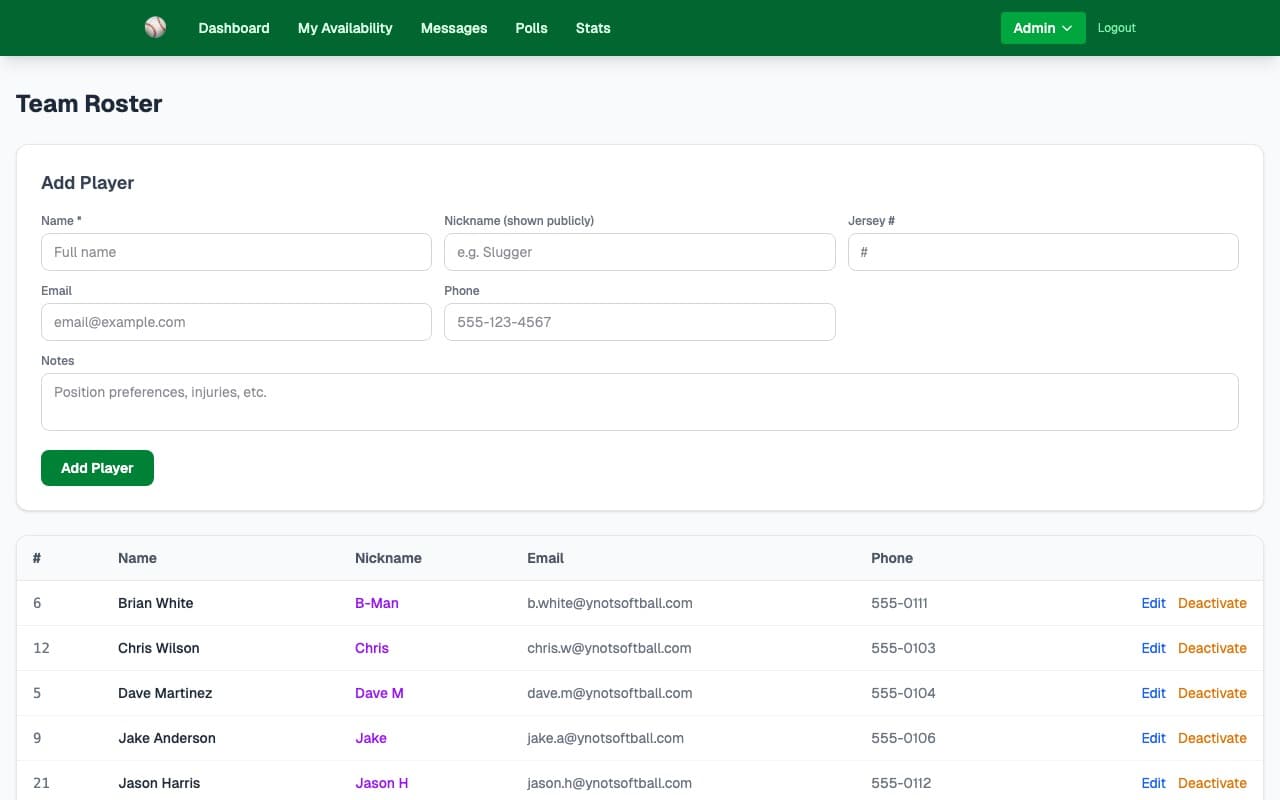
What it does
The admin panel is the control room for your team. Two PINs keep things secure without requiring anyone to create an account: an admin PIN for the team manager and a team PIN for players. Manage your full roster and access every tool from one nav.
- ✓PIN-protected admin access — no accounts or passwords to manage
- ✓Add, edit, and remove players from the roster (name, email, phone, jersey number)
- ✓Separate team PIN lets players set availability without accessing admin tools
- ✓Admin can access schedule management, lineup builder, scoring, messaging, and polls
- ✓View team plan status, expiry date, and manage team settings
- ✓Read-only mode when trial or plan expires — data is preserved
- ✓Change your admin or team PIN any time from team settings
How it works
When you create your team, you choose an admin PIN. Only people who know it can access the admin panel — no user accounts needed.
Add each player's name, jersey number, email, and phone. Their email is used for team messaging, and their name appears in availability and stats.
Give players the team PIN and your team URL. They can set availability, view messages, respond to polls, and see stats — but can't change any admin settings.
Key capabilities
Full Roster CRUD
Add, edit, and remove players at any time. Store name, jersey number, email address, and phone number for each player.
Two-PIN Security
Admin PIN protects all management features. Team PIN gives players read and availability access. Both are independent and changeable.
Team Settings
Set your team name, manage PINs, view your plan and expiry date, and see your team's public URL from the Team Settings page.
Ready to try it?
30-day free trial — no credit card needed. Your team URL goes live instantly.