Softball Lineup Builder
Set your batting order, assign fielding positions for every inning, and print a lineup card — all before first pitch.
What it does
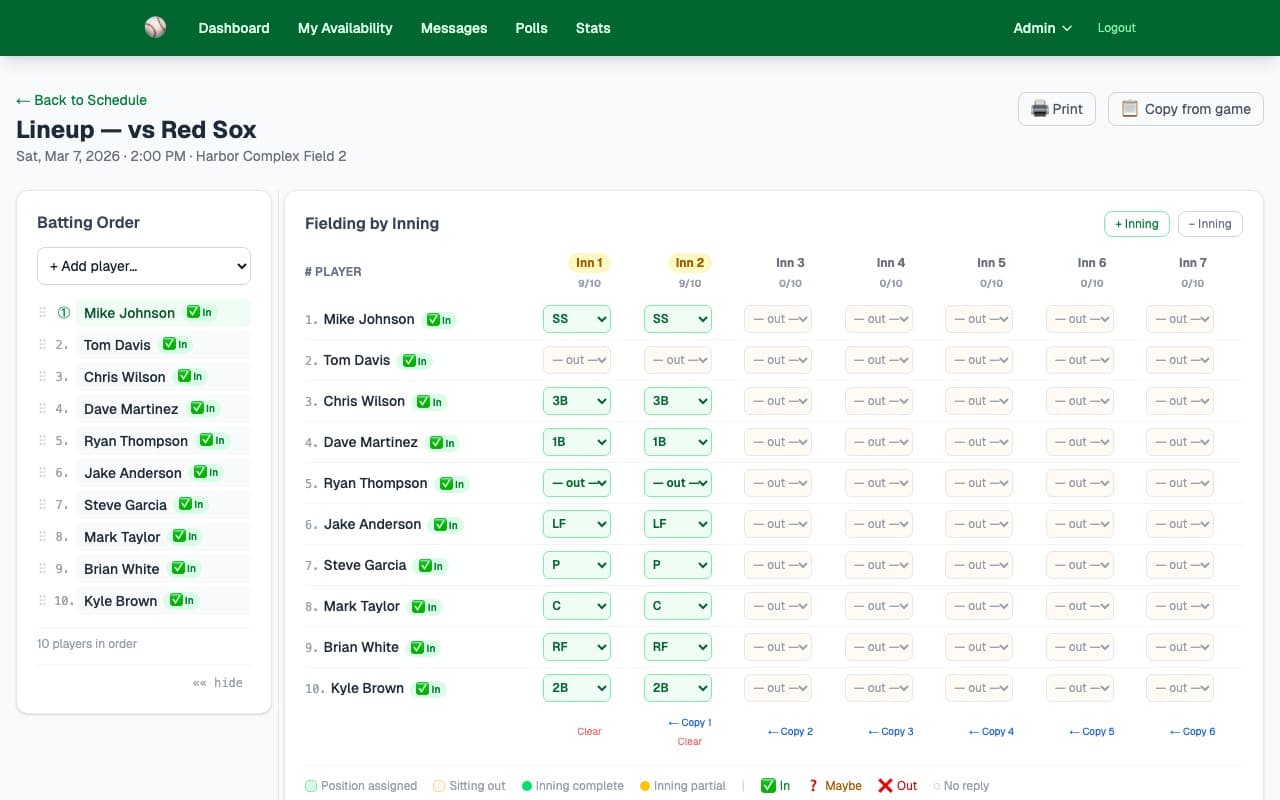
The Lineup Builder shows you exactly who's available (based on their availability status) and lets you arrange the batting order and assign a fielding position for each player in each inning. Copy innings across to save time, then print a card for the dugout.
- ✓Drag and drop players into batting order positions
- ✓Each player's availability status (In/Maybe/Out) is shown inline
- ✓Assign a fielding position for each player in each inning
- ✓Add innings as needed — up to the full game length
- ✓Copy any inning's fielding assignments across to the next inning with one click
- ✓Print a clean lineup card formatted for the dugout
- ✓Copy a lineup from a previous game as a starting point
How it works
Drag players into batting order slots. Players with confirmed availability are highlighted green so you always know who's in.
For each inning, assign a fielding position (P, C, 1B, 2B, SS, 3B, LF, CF, RF) to every player. Use "Copy" to carry a full inning forward.
Hit Print to generate a clean, formatted lineup card. Take it to the dugout or share it with coaches before the game.
Key capabilities
Copy Innings
Set up inning 1 then copy it across every subsequent inning with one click. Edit individual innings when you need to make a substitution.
Availability Inline
Each player's In/Maybe/Out status is displayed right next to their name in the lineup — no switching screens to check who's confirmed.
Print-Ready Card
Generate a formatted, print-ready lineup card with batting order and positions. Takes one click and looks great on paper.
Ready to try it?
30-day free trial — no credit card needed. Your team URL goes live instantly.