Player Availability Tracking
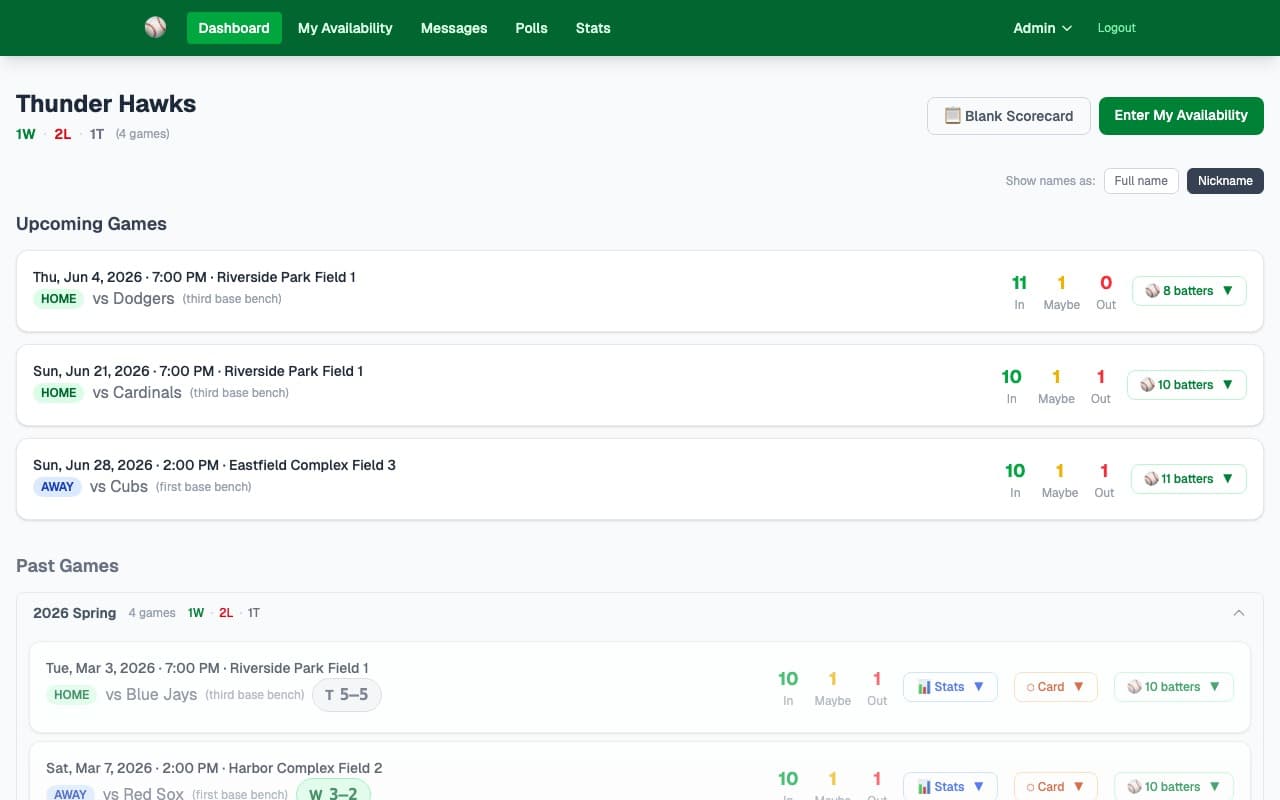
Players tap In, Maybe, or Out for each game. Admins see real-time headcounts across the whole schedule — no group chat needed.
What it does
Stop chasing players on group texts. Every player gets access to a simple page where they can set their availability for each upcoming game and leave a note if needed. Admins see live counts the moment anything changes.
- ✓Players choose In, Maybe, or Out for each upcoming game
- ✓Optional note per game — "might be 10 min late", "not sure until Thursday"
- ✓Admins see live In/Maybe/Out headcounts on the dashboard for every game
- ✓No app download or account required for players — just a shared team PIN
- ✓Works on any smartphone, tablet, or computer
- ✓Past game attendance is preserved for reference
- ✓Admin can see per-player breakdown in the lineup builder
How it works
Give players your unique team URL (e.g. team.ynotsoftball.com/thunder-hawks). They bookmark it and it's always one tap away.
Players enter the team PIN once, select their name, then tap In/Maybe/Out for each upcoming game. Takes about 30 seconds.
The dashboard updates in real time. Game cards show In/Maybe/Out counts so you always know if you have enough players.
Key capabilities
Real-Time Counts
The moment a player updates their status, the In/Maybe/Out counts on the dashboard update for everyone. No refresh needed.
Player Notes
Players can add a short note to any game response — "Running late", "Out of town", "Depends on weather" — so you have the full picture.
No Account Needed
Players access availability with a shared team PIN. No email signup, no passwords, no app store — just a URL and a PIN.
Ready to try it?
30-day free trial — no credit card needed. Your team URL goes live instantly.